What is EXIF data, and should you remove it from your photos?
Folio Team
Every digital photo carries a small note about how it was made. The camera writes it at the moment of capture and tucks it inside the file, where it travels with the image until something removes it. That note is EXIF data.
Most of the time nobody looks at it. It is still worth knowing what it says, because sometimes it says more than you meant to share.
What EXIF data records
EXIF stands for Exchangeable Image File Format. It is a standard way for cameras and phones to store technical details inside an image file, alongside the picture itself. A typical file includes:
- The camera make and model, and usually the lens
- Exposure settings: shutter speed, aperture, and ISO
- Focal length
- The date and time of capture, according to the camera's clock
- Orientation, so software knows which way up the photo goes
- GPS coordinates, if the device has location turned on
Some cameras also record the body's serial number, and many let you set an artist name and copyright notice that get written into every frame.
None of this changes how the photo looks. It is text sitting next to the pixels, and any software that opens the file can read it.
Why photographers keep it around
The first reason is learning. If a shot came out sharper than expected, or softer, the settings are right there to explain it. Looking back through a shoot and comparing shutter speeds against the frames that worked teaches you things about your own habits that are hard to notice in the moment.
The second is organization. Editing software uses the capture time to sort a shoot in order, which matters a great deal when two cameras covered the same event. It also lets you filter a catalog by lens or camera body when you are trying to decide what gear you actually use.
The third is record keeping. The capture date and the copyright fields are a modest but useful trail showing when a photo was taken and by whom. They are easy to edit, so they are not proof of anything on their own, but they are better than nothing when a file gets separated from its context.
What it can reveal
Two fields deserve more thought than the rest: location and time.
A phone with location services on will usually write GPS coordinates into every photo. Many dedicated cameras do not have GPS built in, but some do, and others pick up a location from a paired phone. Coordinates are precise. A portrait taken in a client's living room, or a photo of your own desk at home, can carry an address that anyone with the file can look up.
The timestamp is less dramatic but still tells a story. A set of photos with capture times shows when someone was at a place and for how long. For a wedding that is harmless. For a family session at a private home, or documentary work with people who would prefer not to be traced, it may not be.
The serial number is a smaller concern, but it does tie separate photos to the same camera body.
Whether any of this matters depends on the photo and who receives it. The point is to decide deliberately instead of finding out later.
Why EXIF data sometimes goes missing
If you open a photo and find the metadata empty, there are a few common causes.
Export settings are the usual one. Most editing software lets you choose how much metadata to include when exporting, and a preset set to copyright only, or to none, will quietly drop the rest.
Sharing is another. Many messaging apps and social platforms remove some or all metadata when they process an upload, so a photo saved back from one of them is often bare.
Then there are images that never had it. A screenshot has no camera settings to record. A film scan describes the scanner, not the camera. A fully manual lens with no electronic contacts cannot tell the body what aperture it was set to, so those fields stay blank.
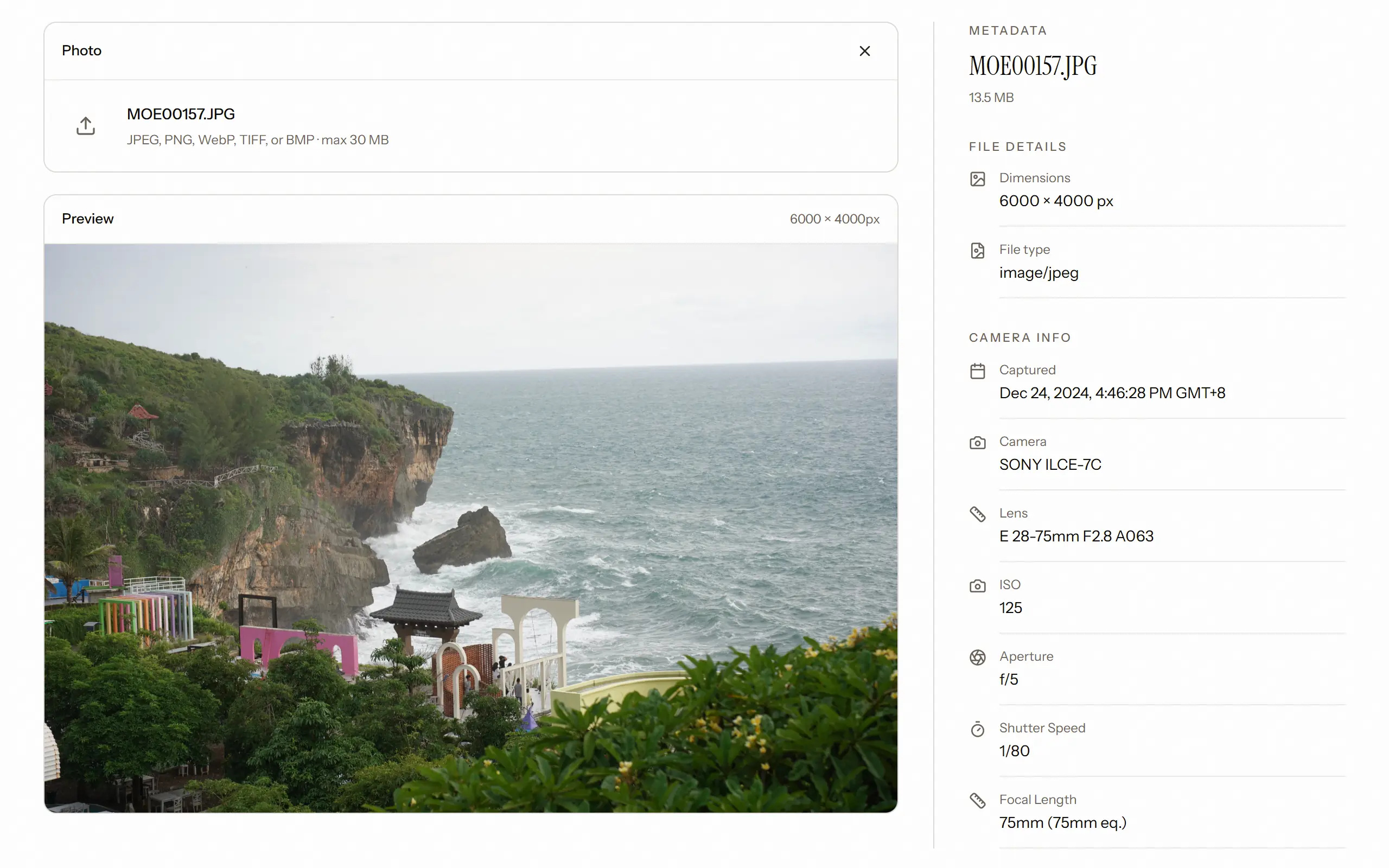
If you want to check what a particular file contains, our free EXIF viewer reads a photo in your browser without uploading it, and shows the camera, lens, exposure settings, and capture date. It does not display GPS coordinates, so use your editing software or your operating system's file info panel to check for location.
Should you remove it?
There is no single answer, but a few rules of thumb hold up well.
Remove location from anything taken somewhere private, unless you have a reason to keep it. Homes, schools, and workplaces are the obvious cases. The simplest approach is to turn off location in your phone's camera settings for client work, and to exclude location in your export preset so you do not have to remember each time.
Keep the copyright and artist fields. They cost nothing and they help a file find its way back to you.
Camera and exposure settings are a matter of audience. Other photographers enjoy them, and on a portfolio they can be a quiet signal that you know your craft. Clients mostly do not care what ISO their portraits were shot at, and a panel of numbers next to each photo can pull attention away from the picture.
It also helps to separate two questions that often get mixed together: what is in the file, and what a visitor is shown on a web page. A gallery can hide metadata from the page while the file still contains it, and the reverse is possible too. If a detail must not leave your hands, take it out of the file at export, before it goes anywhere.
Showing and hiding EXIF in Folio
In Folio, every client gallery has a "Show EXIF data" setting. Turn it on and visitors can see camera details alongside a photo. Leave it off and the gallery stays focused on the images. It is set per gallery, so a set shared with fellow photographers and a client delivery can make different choices.
That setting controls what the gallery displays. For anything sensitive, we would still suggest the habit above and clean the file at export.
— the Folio team